OnSong alternative
OnSong and SONGUIDE are both songbook apps for the stage, with lyrics and chords, transpose, capo and setlists, and both are mostly used on a tablet.
OnSong runs on Apple devices only, and every device has its own library that you sync by hand through Dropbox or Google Drive. Besides iPad and iPhone, SONGUIDE also runs on Android tablets and phones and in any modern browser. You prepare the setlist on a laptop and it is on the tablet right away, with nothing to set up. Every band member uses the device they already own.
SONGUIDE is a modern songbook that stays simple on purpose. OnSong is more powerful if you also run backing tracks, MIDI or lighting from the same app. Here is which app fits whom and what to expect when you switch.
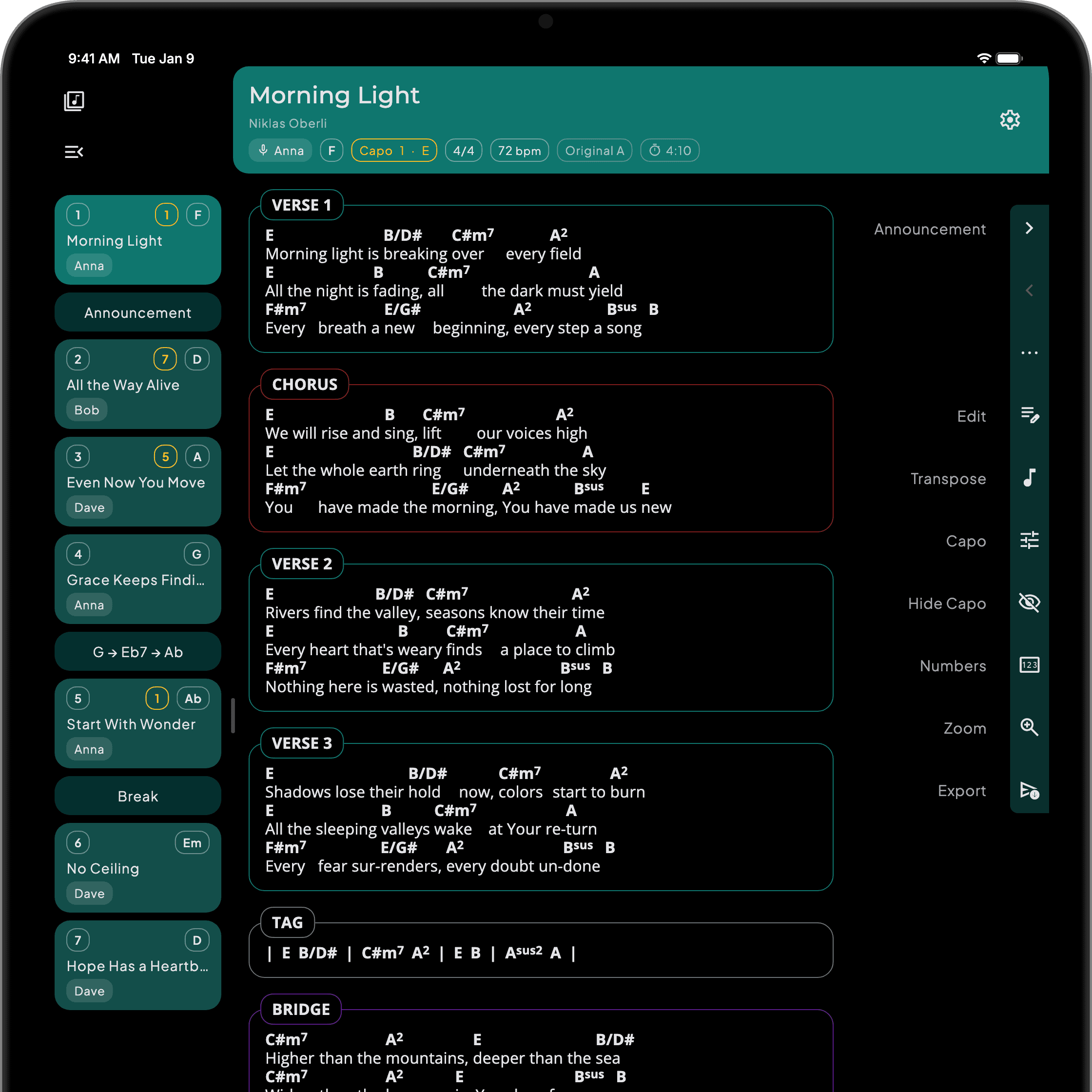
SONGUIDE is the better fit if
- Your band mixes Android, iPad and laptops and wants one app that works and looks the same on all of them.
- You want every change to reach your other devices instantly and by itself.
- You want a songbook that is easy to use, without setting up cloud folders first.
OnSong is the better fit if
- You run backing tracks, MultiTracks, MIDI, lighting or projection from the same app.
- Everyone in your team plays from an iPad, nobody needs a browser, and no new member will arrive with Android.
- Your library carries years of OnSong-specific work such as highlighted charts, linked audio, song flows and sets that would not survive the move.
| Feature | SONGUIDE | OnSong 2026 |
|---|---|---|
| Platforms | Included. iPad, iPhone, Android tablets and phones, and in the browser on Windows, Mac and Chromebook. | Partly. iPad, iPhone and Mac. No Android, no web app. |
| Transpose and capo | Included. Yes | Included. Yes |
| Bluetooth foot pedal | Included. Yes | Included. Yes |
| Folders and setlists | Included. Yes, folders and setlists with drag and drop, plus dividers for announcements and breaks. | Included. Yes, as books and sets. |
| Works offline | Included. Yes. On iOS and Android your library is stored on the device. | Included. Yes. Your library is stored on the device. |
| Sync between devices | Included. Automatic. Every change is on your other devices right away. | Partly. Manual, through Dropbox or Google Drive. Set it up on every device and tap Sync each time. The whole library travels as one database file, and the newer copy replaces the older one. OnSong Cloud backs the library up automatically but does not sync it. |
| Import formats | Included. ChordPro, OnSong, OpenSong, SongSelect, and pasted text with auto-formatting. | Included. ChordPro, SongSelect, PDF, text and more. |
| Export formats | Included. SONGUIDE files for songs, folders and setlists, plus ChordPro and PDF for everyone else. Also on the Free plan. | Partly. ChordPro, PDF, OnSong text and more. Only with a subscription or the one-time OnSong 2020 purchase. |
| Backing tracks, MIDI, lighting, projection | Not available. No. SONGUIDE is a songbook, not a stage controller. | Included. Yes, on Premium: MultiTracks, backing tracks, MIDI automation, stage lighting and lyrics projection. |
| Devices per account | Included. Up to 5 signed in at once, in any mix. | Partly. 2 on Essentials, 4 on Premium. |
| Free plan | Included. Every feature, up to 15 songs. No ads, no card. | Partly. Build a library and view songs. Most features need a subscription. |
| Price | CHF 4.90 per month. | Essentials USD 3.99 per month, Premium USD 5.99 per month. |
- Included
- Partly
- Not available
On the SONGUIDE roadmap: handwritten notes, chord diagrams, PDF and image import and a team library.
Moving from OnSong
Your OnSong library moves over in one import. Songs stored as PDFs in OnSong do not come across yet.
Read the guideQuestions people ask before switching
Is there an OnSong for Android?
No. OnSong runs on iPad, iPhone and Mac only. Besides iPad and iPhone, SONGUIDE also runs on Android devices and in the browser, with the same library everywhere. A band with mixed devices works from the same app.
Can I bring my OnSong library into SONGUIDE?
Yes. Export your library in OnSong and import it in SONGUIDE. Songs, titles, keys and metadata come across. Sets and books do not, so setlists are rebuilt in a few minutes once the songs are in.
Learn moreHow do we share songs or setlists in the band?
Every band member has their own account and a personal library. You send single songs, whole folders or setlists as a SONGUIDE file or as a ChordPro file for other apps. A shared setlist reuses the songs already in the library and creates the missing ones. A shared song or folder arrives as a copy or updates the version you already have.
Learn moreWhat do I give up when I leave OnSong?
Backing tracks, MultiTracks, MIDI automation, stage lighting and lyrics projection. SONGUIDE focuses on being a songbook that is easy to use. If your team runs the stage from OnSong every week, OnSong remains the better tool.
Try it out
Free for 15 songs, no card, and your OnSong songs import in one go.


OnSong is a trademark of OnSong LLC. SONGUIDE is not affiliated with or endorsed by OnSong. OnSong feature and price information is taken from onsongapp.com, last checked on , and may change.